

Put your lap data on your onboard video
Load a .vbo file and your onboard video. Sync them, pick what to show, and export an MP4 with speed, g-force, lap delta and track map burned in. It all runs in your browser.
Free. No account, no watermark. Works in desktop Chrome and Edge.
Your video never leaves your computer
Parsing, sync, drawing and encoding all happen in your browser. There is no upload, no render queue and no waiting for a server.
Onboard videos are big. Keeping them local means you start right away, and nobody else ever sees your footage.
Sharing a lap on social media or with your coach.
No upload time, no privacy worry, no file size limit from a server.
Sync it in seconds
Drop in a .vbo file from RaceChrono or VBOX and your video. GoPro videos with GPS data sync automatically. Other videos sync by hand on a timeline, with the audio trace to help you line up engine noise with speed.
Onboard videos from GoPro or any camera that saves MP4 or MOV.
The preview is drawn by the same code as the export, so what you see is what you get.
Lap timing, not just a speed number
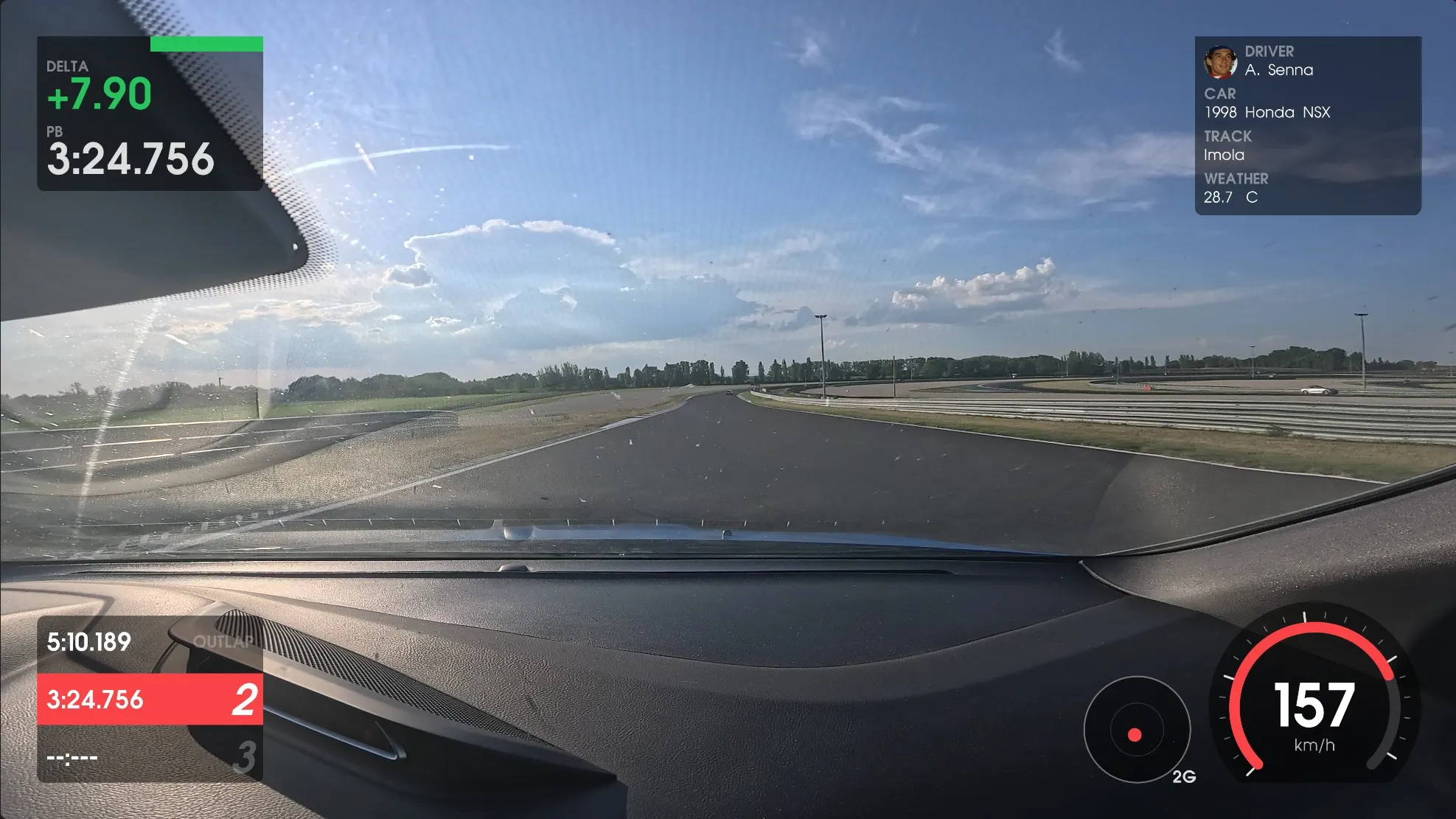
Show speed, g-force, a live delta against your best lap, the lap list, a GPS trace and an info box with driver, car, track and weather. Pick an accent color, switch elements on or off, and export the whole session or only some laps. You can also export the overlay alone and use it in your video editor.
A clean lap video where viewers can see where you gain and lose time.
Lap delta and lap-range export are what make it useful for track days, not only for a nice picture.
How it compares
There are good tools for this already. Here is where TrackHero Overlay fits.
| TrackHero Overlay | RaceRender | RaceChrono | Dragy | |
|---|---|---|---|---|
| Where it runs | In your browser | Desktop app | Phone app | Online |
| Watermark | None | n/a | n/a | Yes |
| Account | Not needed | n/a | n/a | n/a |
| Price | Free | Paid license | Paid app | n/a |
Based on public information. Tools change, so check the details on their own sites.
Questions drivers ask
Which files does it read?
A .vbo file from RaceChrono or VBOX, or the GPS data inside a GoPro video. Video can be MP4 or MOV. CSV and GPX are not supported yet.
Is my video uploaded?
No. Everything runs in your browser. Your video and data stay on your computer.
Which browsers work?
Desktop Chrome, Edge and other Chromium browsers. Firefox, Safari and phones are not supported, because the app needs the WebCodecs feature.
Is it really free?
Yes. No account, no watermark and no time limit.
Do I need a TrackHero account?
No. TrackHero keeps your sessions and analyses your laps. TrackHero Overlay turns a .vbo file and a video into one finished video, and it works without an account.
Make your next lap video
Open the app, drop in your files, and export in a few minutes. Free, and your video stays with you.